Ask a Canadian mortgage broker where the conversation with a given client lives and the honest answer is usually “in a few places.” The initial enquiry came through a website form and landed in email. The document chase happened over text because that’s what the client answers. The lender’s condition list arrived as a PDF attachment in a different email thread. Two important clarifications happened on a phone call and exist only in the broker’s memory.
Every one of those channels works. The problem is that none of them knows about the others.
This post is about what that fragmentation actually costs, what a unified inbox means in the specific context of a mortgage file, and how to evaluate whether a given tool solves the problem or just moves it. Written for Canadian brokers running 20+ live files at a time, where the failure mode stops being annoying and starts being expensive.
Short answer: A unified inbox puts every email, text and call with a client on one timeline and ties each message to the mortgage file it belongs to. For Canadian brokers running 20 or more live files, that is what stops conditions slipping, makes handoffs possible, and leaves one record you can show a lender, a regulator or a FINTRAC examiner.
The real cost of a fragmented conversation
The cost is not the seconds you spend switching apps. That’s a productivity complaint and it’s the least interesting part of this.
The cost is that context does not survive the switch. When you open a text from a client that says “sent it,” you need to know what “it” was, which file it belongs to, which condition it satisfies, and whether the lender’s deadline on that condition is tomorrow or next week. None of that is in the text message. It’s in your email, your lender portal, and your head.
So you reconstruct it. Every time. And reconstruction is where things break:
- Conditions get satisfied twice or not at all, because the document a client texted was never filed against the condition it clears.
- The follow-up that matters gets buried under the follow-up that doesn’t, because a text notification and a marketing email arrive with the same visual weight.
- A co-applicant emails from an address you don’t recognize, and the message sits unread for two days because nothing connects it to the file.
- The handoff is impossible. When you’re away, nobody can pick up a file whose history lives across four tools and one person’s recollection.
4
separate tools the typical Canadian broker uses to talk to one client on one deal: email client, personal phone for texts, phone system for calls, and the lender portal for conditions. None of them share context.
The deals you lose to this are rarely lost dramatically. They’re lost as a slow accumulation of small frictions that make you slightly slower and slightly less reliable than the broker who isn’t fighting their own tooling.
What “unified” has to mean to be worth anything
The term gets used loosely. A tool that shows email and texts in two adjacent panels is not unified, it’s co-located. The distinction matters because co-location solves the app-switching complaint and leaves the actual problem untouched.
A genuinely unified inbox has four properties.
One list, one sort order
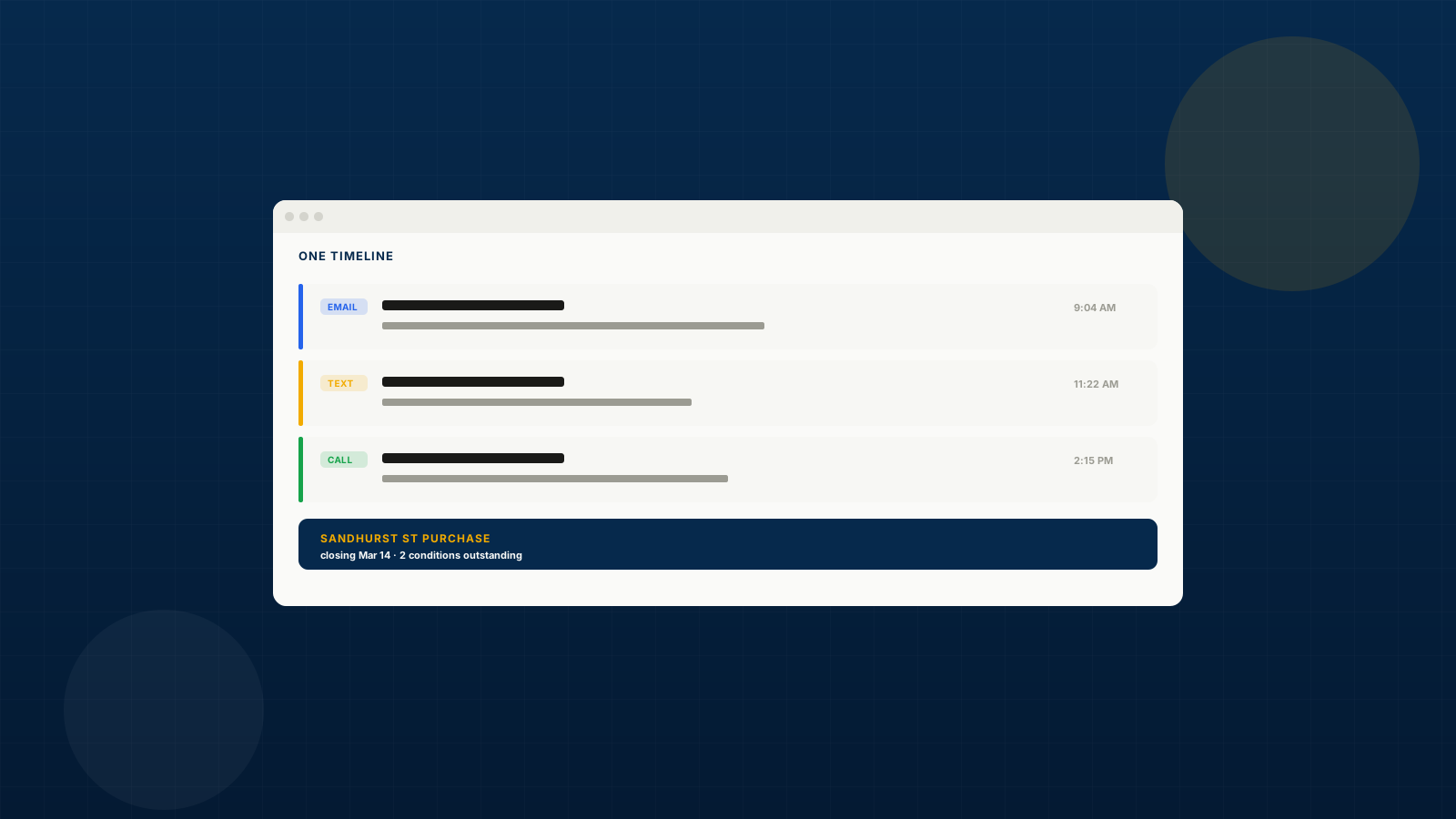
Email, texts, and calls arrive in a single stream ordered by when they happened. If a client emailed at 9am, texted at 11am, and called at 2pm, you see those three events in that order, as one conversation. Not three conversations in three tabs.
This sounds trivial. It is the entire foundation, because it’s what makes the next three properties possible.
Every message resolves to a person, and every person resolves to a file
An inbound message is not “an email from dan.k.mortgage@gmail.com.” It’s a message from Dan Kowalczyk, who is the co-applicant on the Sandhurst Street purchase, closing March 14, currently waiting on two conditions.
That resolution has to happen automatically, on arrival. If it depends on you tagging the message, it will be right for the first two weeks and wrong forever after.
The file context is visible without leaving the message
When you open the thread, the deal it belongs to, its stage, its outstanding conditions, and your recent history with that person should be on the same screen. Not one click away. On the screen.
This is the property that most tools fail, and it’s the one that converts a mail client into a broker tool. The point of reading the message is to act on it, and acting on it requires knowing the state of the file.
You can act from where you are
Reply by email, send a text, or place a call from the same surface, and have all three land back on the same timeline. If replying by text means opening your phone, the timeline has a hole in it the moment you’re busy.
What this changes operationally
Three things change, and they compound.
Handoffs become possible. A file whose entire communication history is one timeline can be picked up by a partner, an assistant, or a compliance reviewer without a briefing. For solo brokers this matters at vacation time. For brokerages it’s the difference between agents who can cover for each other and agents who can’t.
Response time drops on the messages that matter. When every channel lands in one prioritized list, urgent things stop competing with newsletters for your attention. Most brokers find their median response time on client messages improves less than they expected and their worst response time improves dramatically. The worst case is what loses deals.
The file documents itself. Compliance review, a lender question about what was disclosed and when, a client dispute about what was agreed: all of these become a matter of reading one timeline rather than reconstructing four. In a FINTRAC examination context, where the burden is on you to show your work, this is worth more than it first appears.
The Canadian specifics
Two things make this harder in Canada than the generic pitch suggests.
Texting is not optional. Canadian borrowers, particularly under 45, answer texts and ignore email. A broker who won’t text is a broker with a slower document chase. But personal-phone texting means client communication lives on a device that isn’t backed up, isn’t searchable, isn’t reviewable, and leaves with the agent when they change brokerages. A brokerage that has never thought about this has a records problem it hasn’t discovered yet.
CASL applies to the commercial messages, not the transactional ones. Conversation with an active client about their live file is not a commercial electronic message in the sense CASL polices. Marketing to your past book is. A unified inbox should keep these clearly separate, because the consent rules, the unsubscribe obligations, and the record-keeping requirements are genuinely different. Tools that blur conversation and campaign into one “messages” concept make it easy to send the wrong thing to the wrong list.
How to evaluate a unified inbox
Six questions. The answers separate real products from repackaged mail clients.
- Does it connect to my actual mailbox, or does it want me to send from a new address? Sending from
broker@platform.com when your clients know sarah@brokerage.ca will hurt deliverability and confuse people. It should connect your existing Gmail or Outlook.
- What happens to a message from an unknown number or address? The good answer is that it creates a contact and prompts you. The bad answer is that it lands in a general bucket you’ll never sort.
- Do calls belong to the timeline? Not just a call log. The call, its recording, and its summary, threaded to the same person as their emails.
- Can I link a message to a deal after the fact? Automatic resolution will sometimes be wrong. If you can’t correct it manually in one action, you’ll stop trusting the automatic version.
- What does the brokerage see? For principal brokers, whether agent communication is reviewable is a supervision question, not a feature question.
- What happens when I leave? Export. If the timeline is your file record, you need to be able to take it.
Where BrokerPlus lands
BrokerPlus puts email, texts, and calls on one timeline per contact and resolves each one to the deal it belongs to. Email connects through your existing Gmail or Outlook rather than a new sending address. Texts and calls run on a number issued to you inside the platform, so client texting stops living on a personal device.
Opening a thread shows the resolved contact, the linked deal, that person’s other deals, your recent history with them, the referral relationship, and any notes on the thread. You can reply by email, send a text, or place a call without leaving it. Ann, the assistant, can draft the reply for you to approve, reject, or revise before anything sends.
The design principle is that reading a message and knowing what to do about it should be the same action.
The inbox is not a separate product. It is the communication layer of the BrokerPlus origination system, so the same timeline holds the application, the documents, the conditions and the lender submission. That is why it replaces a separate CRM rather than sitting beside one.
Frequently asked questions
Do I have to give up my current email client?
No, and you shouldn’t have to. A unified inbox that connects to your existing Gmail or Outlook mailbox means messages stay where they are and remain accessible however you’re used to reading them. Anything that requires you to abandon your mailbox is asking for a migration, not offering an integration.
What about texting from my own cell number that clients already have?
Most brokers keep their personal number for existing relationships and move new client communication to a platform-issued number over time. Porting an existing number is usually possible but takes weeks and locks you in, so it’s worth being deliberate rather than doing it on day one. The practical middle ground is to use the platform number for all new files and let the personal number age out.
Is recording client calls legal in Canada?
Yes, with the right handling. Canada is a one-party consent jurisdiction for Criminal Code purposes, meaning a participant may record. But PIPEDA governs what you then do with the recording, and best practice, plus provincial regulator expectations, is to notify the caller that the call is recorded. Any platform that records should announce it. Treat the recording as client personal information for retention and access purposes.
How does this differ from a CRM’s activity log?
A CRM activity log is a record of what happened, written after the fact, usually by you. A unified inbox is where the communication actually occurs. The difference shows up in completeness: activity logs are only as good as the discipline of the person updating them, and under deadline pressure that discipline is the first thing to go.
Will this help with FINTRAC record-keeping?
Indirectly but meaningfully. FINTRAC obligations are about client identification, risk assessment, and specific record types, not about your inbox. But when an examiner asks how you determined something or when a client provided information, having one chronological record per client is dramatically easier than assembling it from four sources. It doesn’t satisfy the requirement; it makes proving compliance much less painful.
What if my brokerage already provides an email system?
Then the question is whether it does the other three things: resolve messages to files, show deal context in the thread, and include texts and calls. Most brokerage email is just email. A unified inbox sits alongside it by connecting to it, rather than replacing it.
Does a solo broker with 40 files a year need this?
Less urgently than a broker running 20 concurrent files, but the threshold is lower than people assume. The pain scales with concurrent files rather than annual volume, because the failure is context-switching between live conversations. A solo broker with 8 to 10 live files at once already feels it.